

PLATFORM GUIDE
To jump to a particular section, click on the relevant title below.
Each of the sections below contain slideshows to help you use the Tagsmart platform. To view the next slide in each of the slideshows, click on the arrow to the right of the image. Click on the arrow to the left to go back a slide.
If you have any questions, don’t hesitate to contact us by email at support@tagsmart.com
Tagsmart In A Nutshell
Personalise Your Account
Build A Portfolio
Verify An Artwork
Share A Verified Artwork
DNA Tag An Artwork
Issue A Certificate
Transfer The Provenance Record
TAGSMART IN A NUTSHELL
All the things you can do using your Tagsmart account.
Personalise Your Account
Update your studio or gallery profile and add your personal and billing information.
Build A Portfolio
Upload artworks and attribute them to an artist on the Artist Register, which holds information (bio, social media links etc) about Tagsmart artists. At this stage artworks are unverified and can be deleted.
Verify An Artwork
Anyone can add an artwork to the platform and attribute it to an artist on the Artist Register. This artwork has no significance until it is verified by an authority.
The Authority System is unique to Tagsmart. For each artist on the Artist Register, there can be one or more authorities. These authorities are either the artist themselves, their immediate proxy (for example, their Studio Manager) or an appointed agent (for example, their gallery).
This ensures that only suitably qualified people can 'verify' a record - and only verified works can be Certificated, shared etc.
Share A Verified Artwork
Publish and share an artwork with family and friends via email or social media.
DNA Tag An Artwork
Tag an artwork using our proven technology and assign the Tag ID to the artwork record to complete the security process.
Issue A Certificate
Certify a verified artwork at any time, upon sale or on consignment. Have our system auto-sign it and delivered direct to the recipient to save you the hassle.
Transfer The Provenance Record
Invite the Certificate recipient to access the digital provenance record.

ARTWORKS VIEW: Click on ARTWORKS at the top right of the screen to view all works in your portfolio, search for a particular record, add new artworks, and apply filters to manage your portfolio.
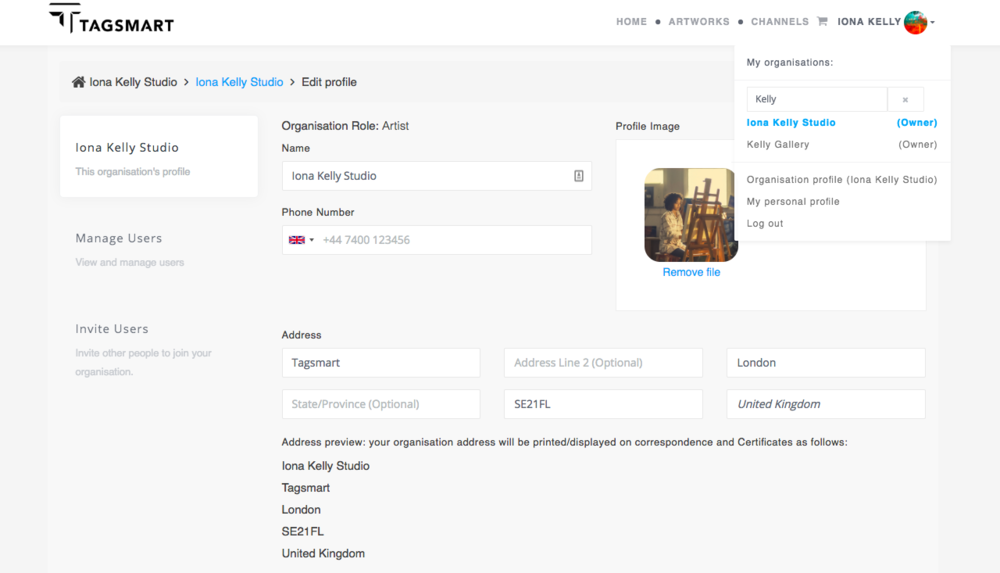
STUDIO/GALLERY INFO: Click on your name at the top right of the screen and select ‘Organisation profile’ to update your account details. If you are a member of more than one account, the account you are currently in will appear in blue. Click on a different name to switch account.

PERSONAL/BILLING INFO: Click on your name at the top right of the screen and select ‘My personal profile’ to update your billing information and manage your Tagsmart invitations.
Manage Multiple Accounts
Tagsmart accounts can have multiple users which enables you to work effortlessly with other artists, galleries, printers or conservators. You can invite new or existing users to join your account and manage your own invitations from one central login.
How to Invite Users to your Account
Click on the arrow to the right of the slide below to find out how to invite users to join you.
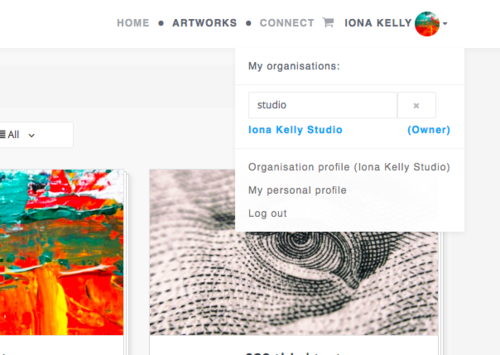
STEP 1: Click on your name in the top right of the navigation bar and go down and click on ‘Organisation profile’. If you are already a member of more than one account then ensure the one you want is highlighted in blue.
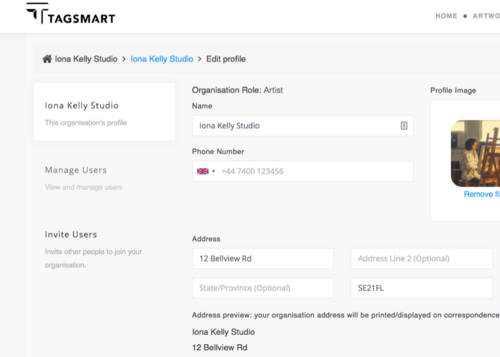
STEP 2: You will see your ‘organisation’ (studio/gallery) profile. Click on Invite Users in the left-hand column.

STEP 3: Click on the blue invite button.
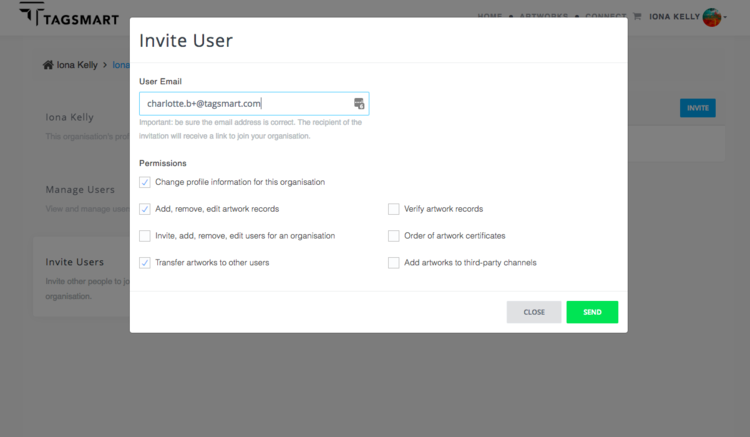
STEP 4: Enter the email address of the person that you wish to invite. Then select the permissions that you want to give them and click Send. An invitation email will be sent to the person with instructions on how to join the account.
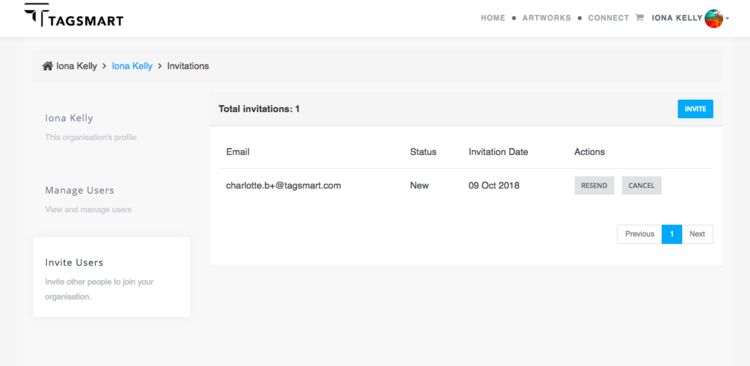
View existing invitations, which you can cancel or resend.

Click on Manage Users to view current users and change their permissions by clicking on Manage next to their name.

STEP 1: From the homepage, click on Build your portfolio or click on Add New Artwork if you’re in Artworks View.
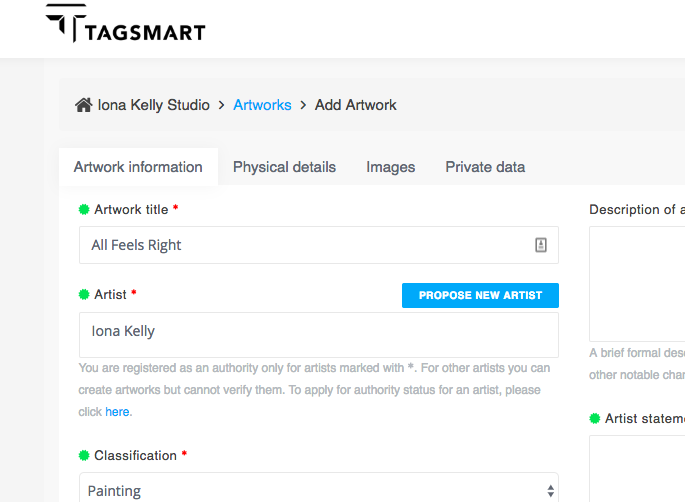
STEP 2: Enter the artwork information under the 4 tabs: Artwork information, Physical details, Images and Private data. Fields marked with a red * are required. Those marked with a green rosette appear on Certificates of Authenticity.
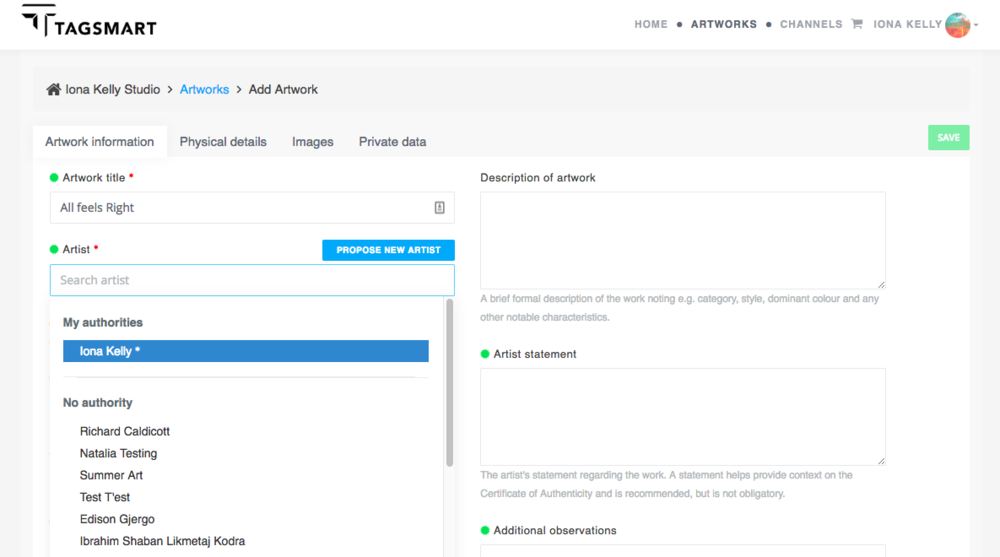
Entering artwork information: Add the core artwork information. If the name you want doesn’t appear in the Artist Search, click on Propose New Artist. Names with * next to them are artists you have authority for.
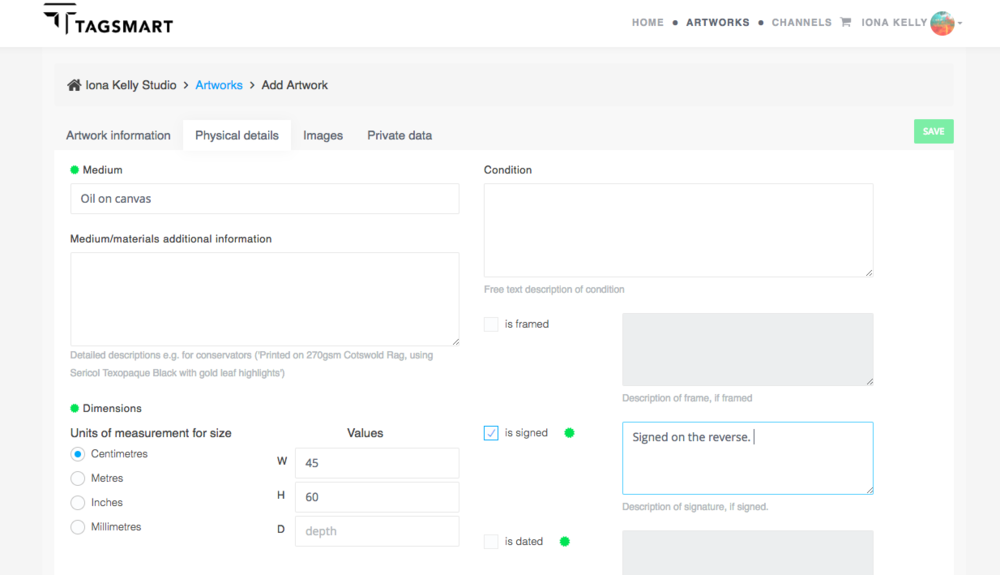
Entering physical details: Add information about the medium, dimensions and signature etc.
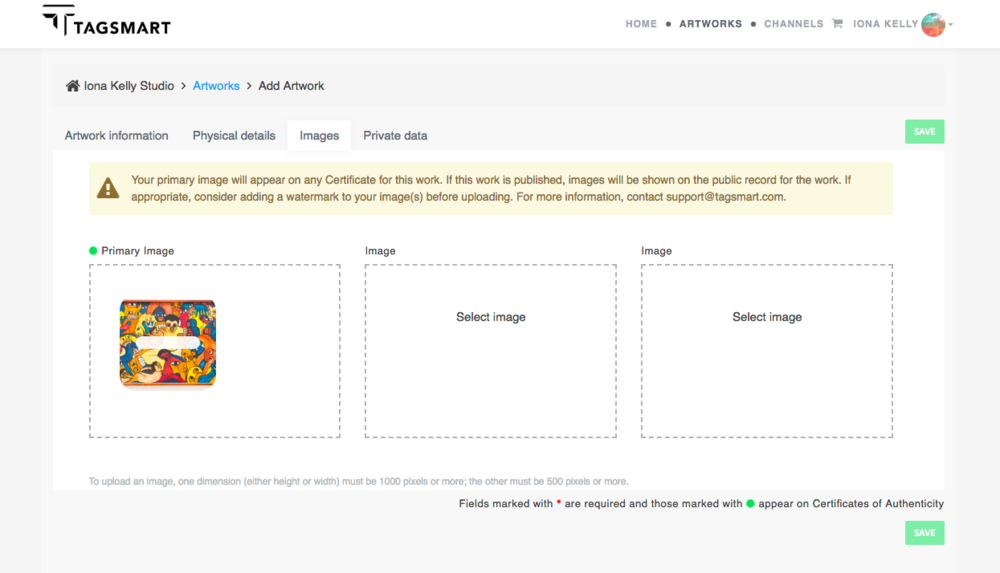
Adding images: Images must be a minimum of 500px in one dimension and 1000px in the other. If an image is much larger than this, it may not upload so best to re-scale it and try again.
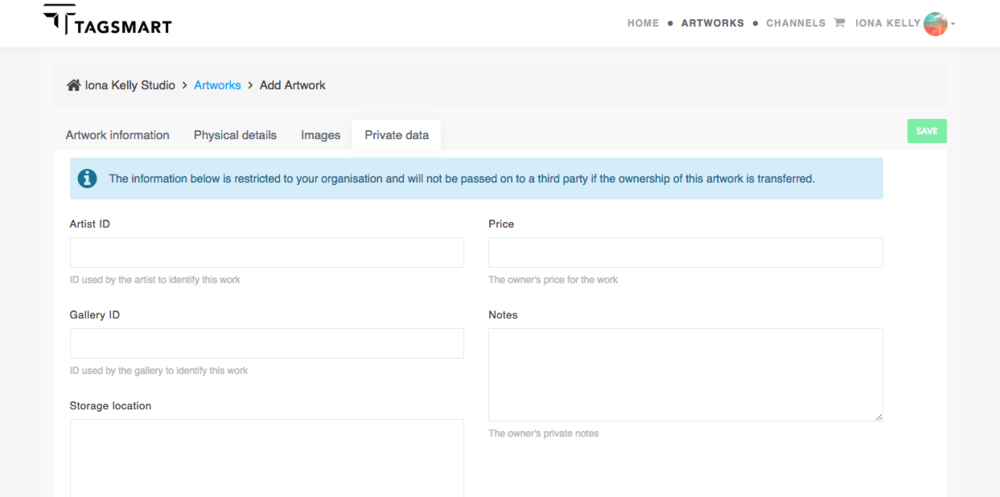
Adding private data: All information entered in the private data section will not be shared when the record is transferred. If you are submitting an artwork to a Channel, enter the price here.
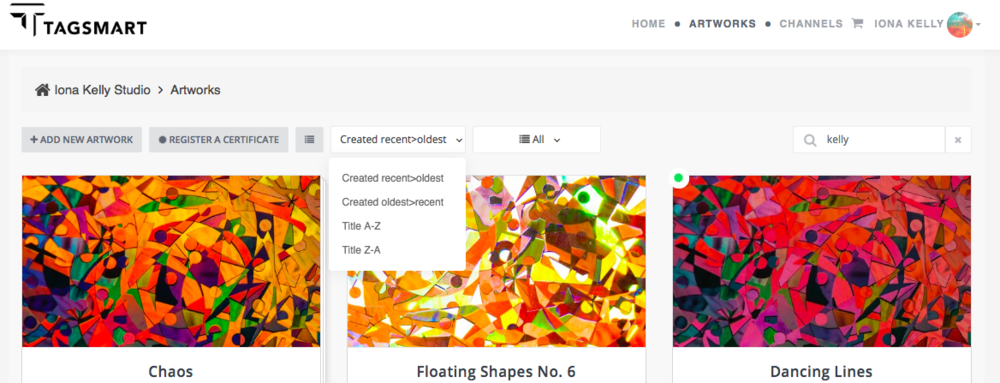
Sort your Artworks: View your artworks alphabetically or by date created.
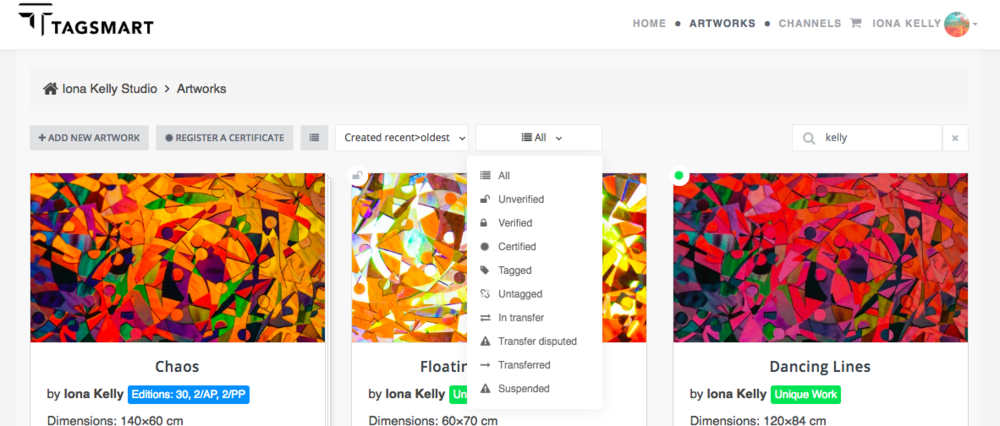
Filter your Artworks: Filter your artworks to view only those which are verified, tagged, certified etc.

Artwork Unverified

Transfer
Active

Transfer Disputed

Artwork
Verified

Transfer Pending

Artwork Suspended

Certificate Issued

Transferred
Out

Transferred In
Verify an Artwork
To verify an artwork, you must be an Artist Authority. If you already have Authority Status, a * will appear next to the artist name when you add a new artwork and a small Padlock Icon will be visible on the artwork record. If you don’t see either of these, you don’t yet have Authority Status.
Once you have Authority Status, the process for verifying works is slightly different for unique works and limited editions.
How to Verify a Unique Work
Click on the arrow to the right of the slide below to find out how to verify a Unique Work.
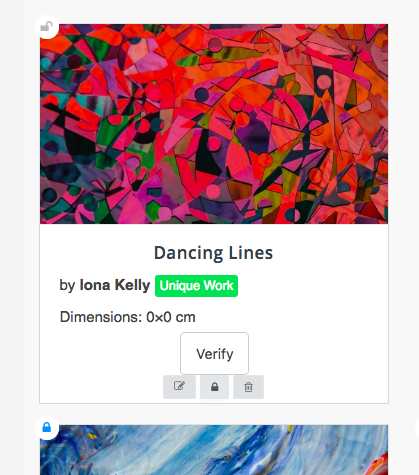
STEP 1: Click on the Padlock Icon on the artwork record.
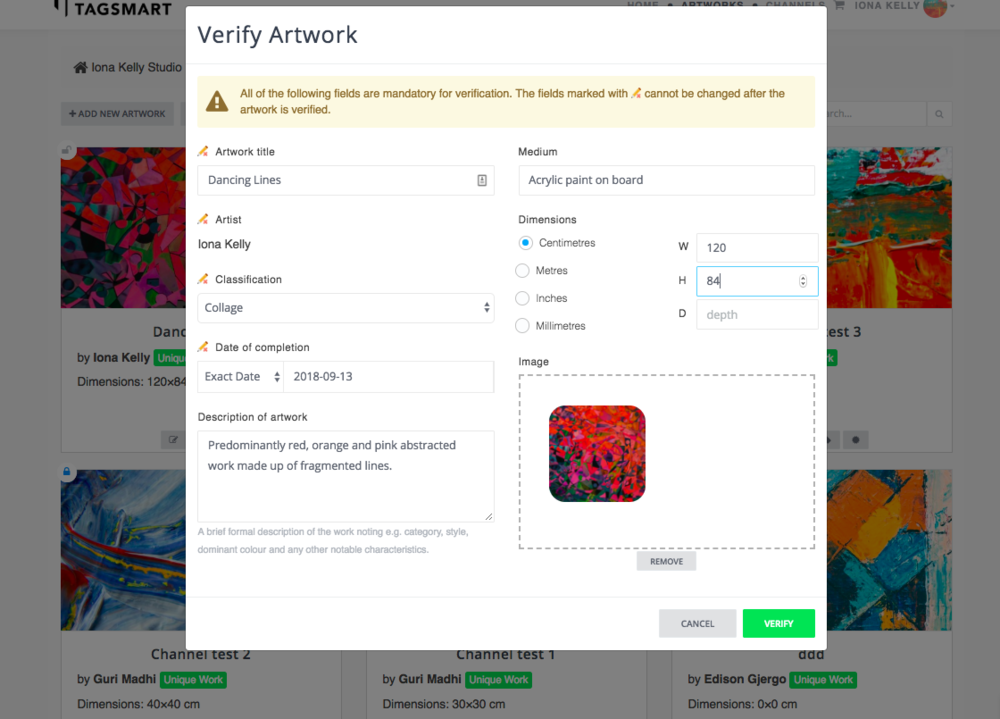
STEP 2: Confirm the artwork information, ensuring that all fields are filled in. You won’t be able to change the artwork title, artist or date completed after verifying so please ensure those entries are correct before proceeding. Then click ‘Next'.

STEP 3: Select whether you’d like to publish the artwork. You can publish the work and make it visible on your artist profile, publish the work but not have it included on your artist profile or not publish the work at all. Click on one of the options and then click Verify.
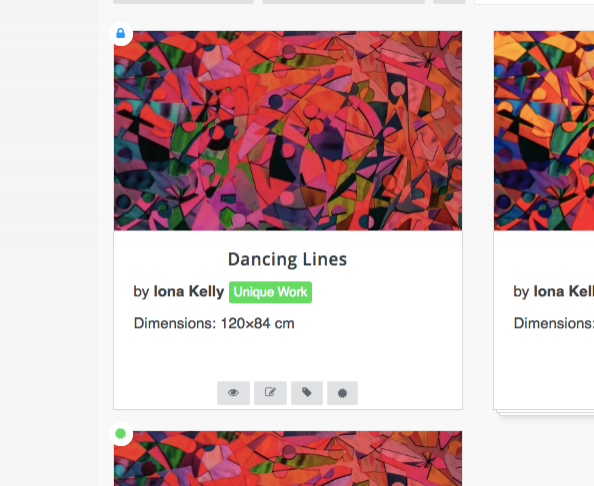
The verified record will have a blue closed padlock icon at the top left and the View, Tag and Certify icons will appear at the bottom. Click on the eye icon to view more artwork details.

Artwork view mode displaying more artwork information, the provenance record and Publish function at the top right of the record.
How To Verify A Limited Edition
Click on the black arrow to the right of the slide below to find out how to verify a Limited Edition.

STEP 1: Click on View Edition at the bottom of the artwork record.
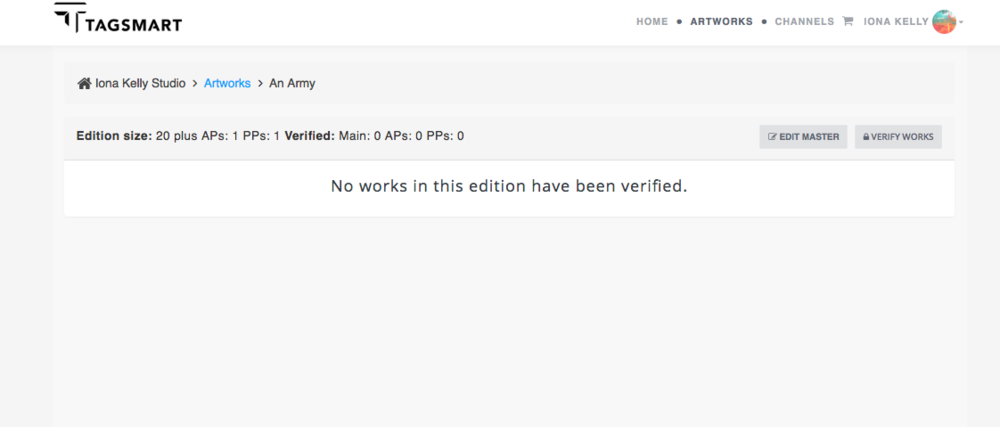
STEP 2: Click on Verify Works at the top right of the screen. If you have already verified part of the edition, this will be listed below.
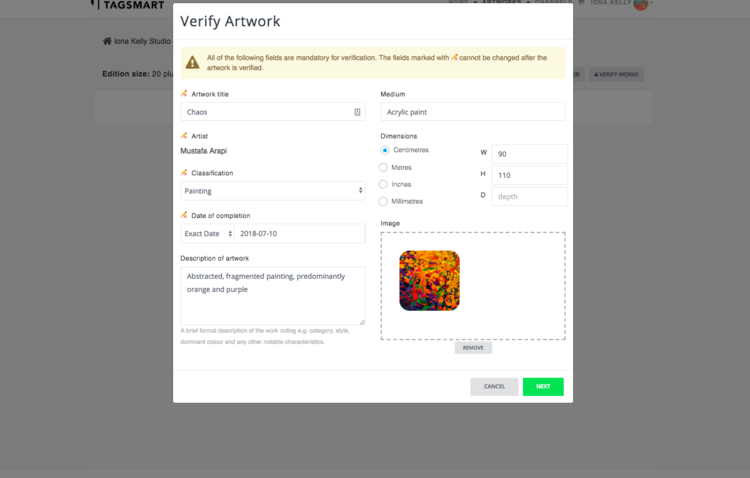
STEP 3: Check artwork information ensuring that all fields are filled in. Title, artist and date completed cannot be changed after verifying. Then click ‘Next’.
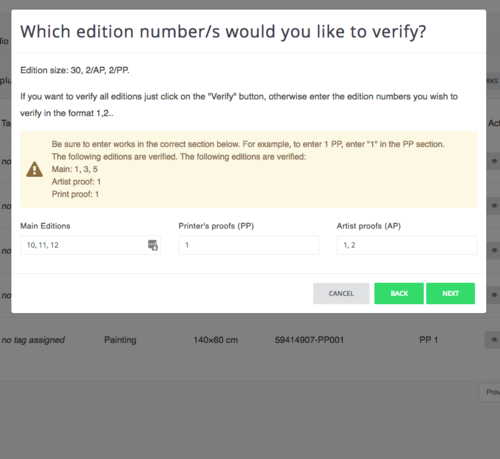
STEP 4: Enter numbers in the Main, AP and PP fields to verify parts of the edition or leave these blank and simply click Verify to verify the whole edition.
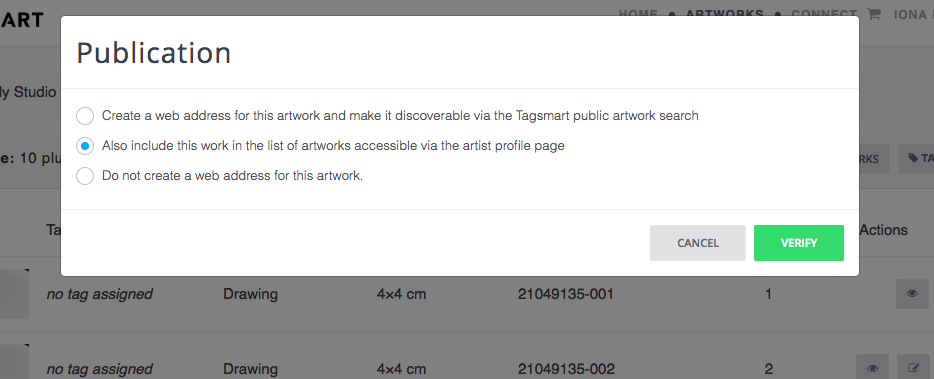
STEP 5: Select whether you’d like to publish the artwork. You can publish the work and make it visible on your artist profile, publish the work but not have it included on your artist profile or not publish the work at all. Click on one of the options and then click Verify.
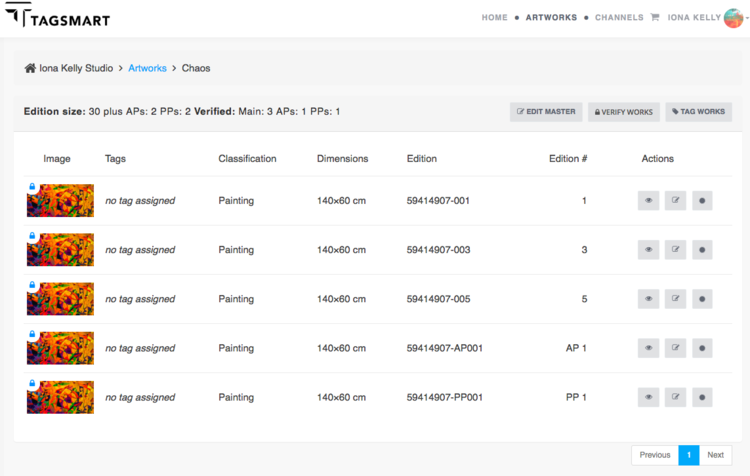
The editions that you verified will appear below. Click on the Eye Icon to view the full artwork record.
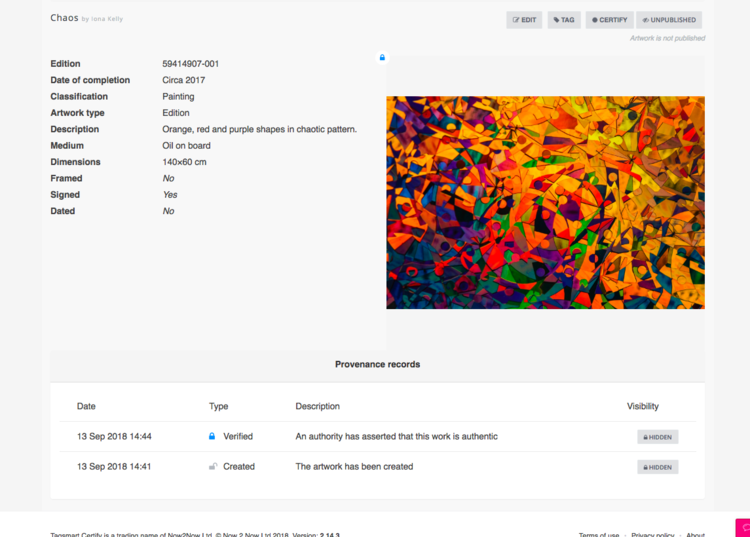
Artwork view mode displaying more artwork information, the provenance record and Publish function at the top right of the record.
Share a Verified Artwork
You can publish a verified artwork to the Tagsmart Directory to enhance your profile when people search for you.
What is the Tagsmart Directory?
The Tagsmart Directory is a list of all artists on the Artist Register along with all published artworks. It is important that profiles are up-to-date and accurate, particularly if submitting works to an online retailer.
How to Publish an Artwork
Click on the black arrow to the right of the slide below to find out how to publish your artworks to the Tagsmart Directory. Artworks can be published by the artist or an artist-appointed authority. NB it is a requirement that all artworks submitted to a channel are published.

STEP 1: For a Unique Work, click on the eye icon or for a Limited Edition, click on View Edition and then the eye icon on the relevant record.
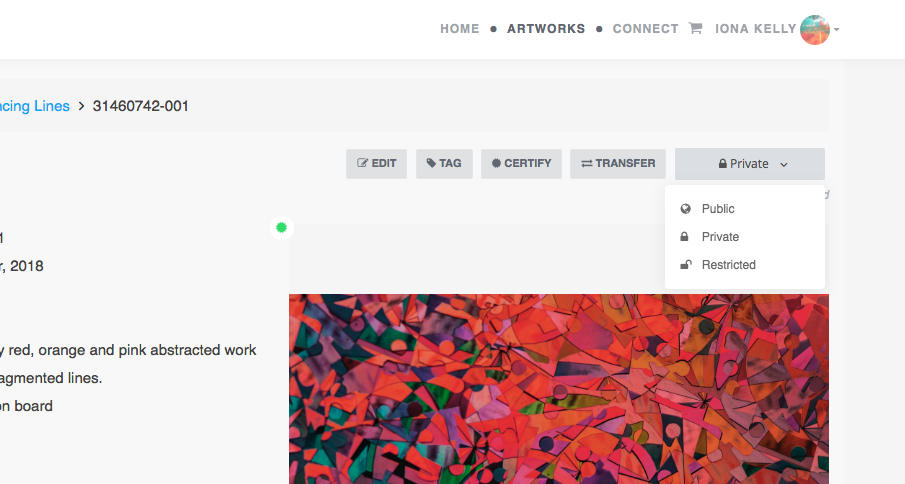
STEP 2: Click on Private at the top right of the artwork record and a dropdown box will appear. Select one of Public, Private or Restricted.
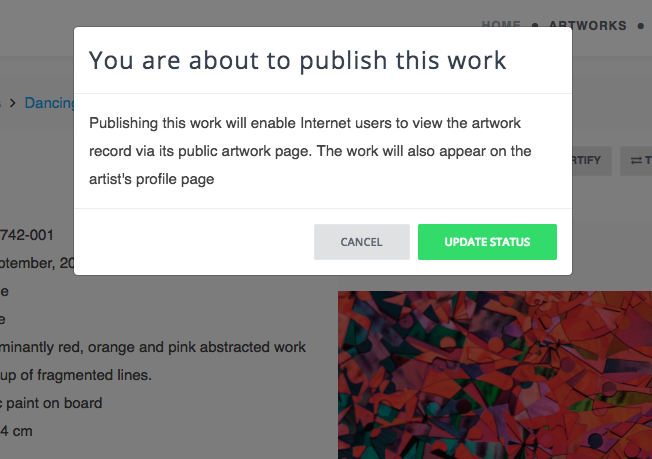
STEP 3: To confirm the publication, click on Publish or to go back click on Cancel.
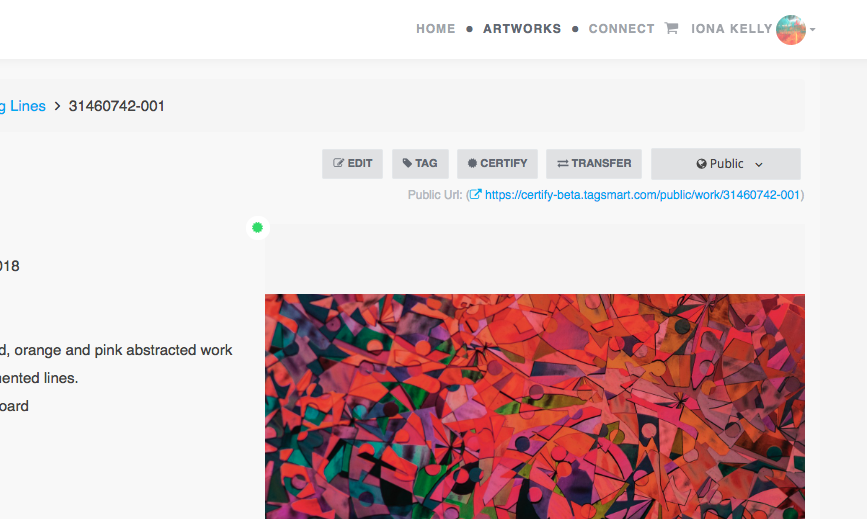
STEP 4: On the record, the status will change to Public or Restricted. Click on the URL to view the public record.

Public artworks will appear on the artist’s public profile. Restricted artworks won’t.
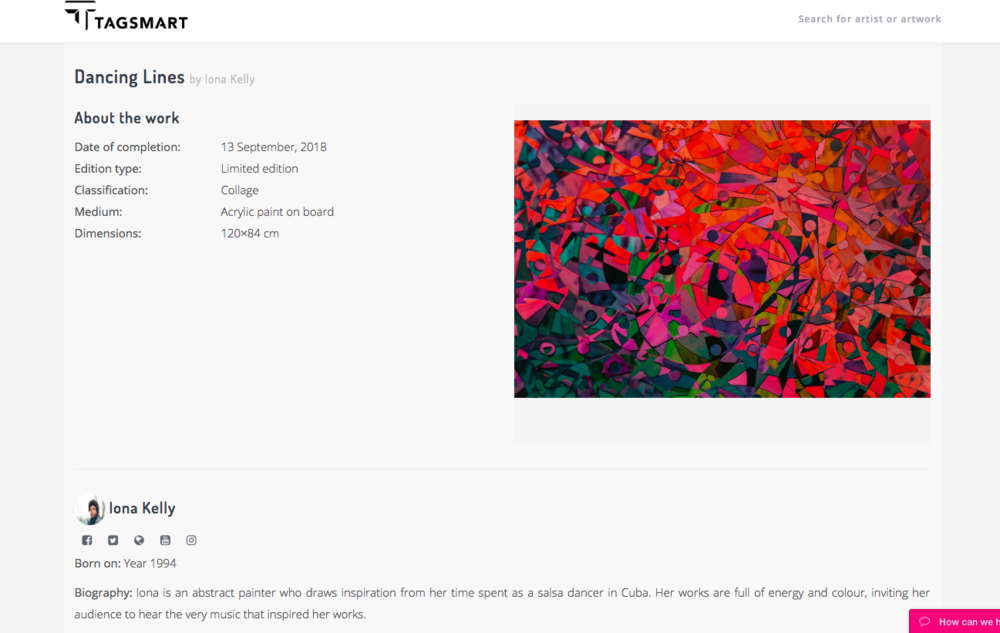
Both Public and Restricted artworks will have a URL which is sharable online and searchable through the Tagsmart Directory. Also access the artist’s bio and social media and website links.
Connect to Online Retailers
Tagsmart Connect is our new service that puts artists in touch with online retailers. At launch, Connect is available only to selected artists. For more information, click below:
Browse available Channels
If you are signed up to the service already, click on CONNECT at the top right of the screen to access available channels. See the slide below to find out how to navigate a channel.
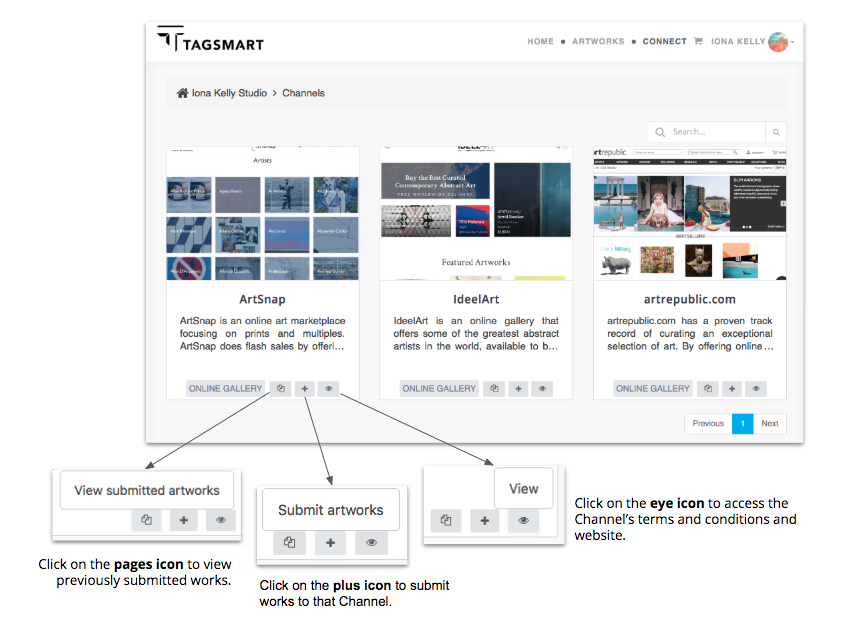
Before Submitting an Artwork to a Channel
When a channel reviews submissions, they will have access to the public artist profile so it is important that these are up-to-date and accurate with an image and social medial links. Click here to learn more about artist profiles.
To submit an artwork to a channel it must:
be verified (click here to learn how to verify an artwork)
have a price in £ (excluding VAT) entered in the 'Private Data' section of the artwork record (see below for how to add an artwork price)
If these two processes are not completed, the artwork will not be available for submission.
How to Add an Artwork Price
Click on the arrow to the right of the slide below to find out how to add an artwork price.
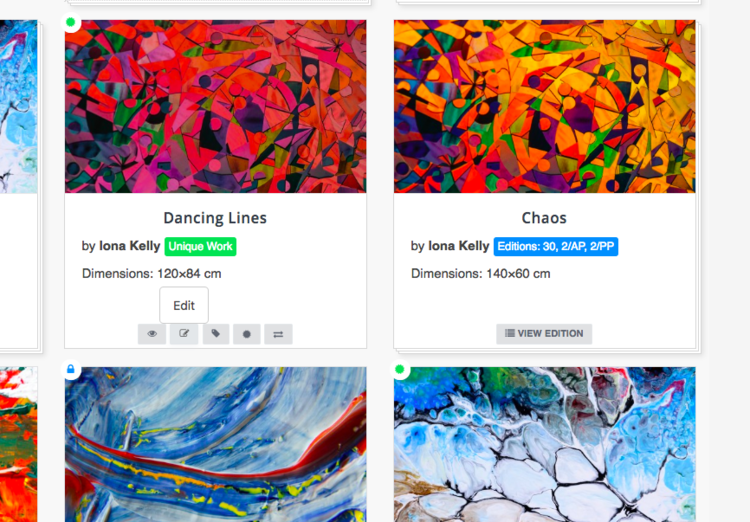
STEP 1: For a Unique Work click on the edit icon on the artwork record. For a Limited Edition, click on View Edition and then you have two options: 1. Click on Edit Master and insert a price for all parts of the edition. 2. Click on the edit icon on the individual edition and insert a price just for that edition number.
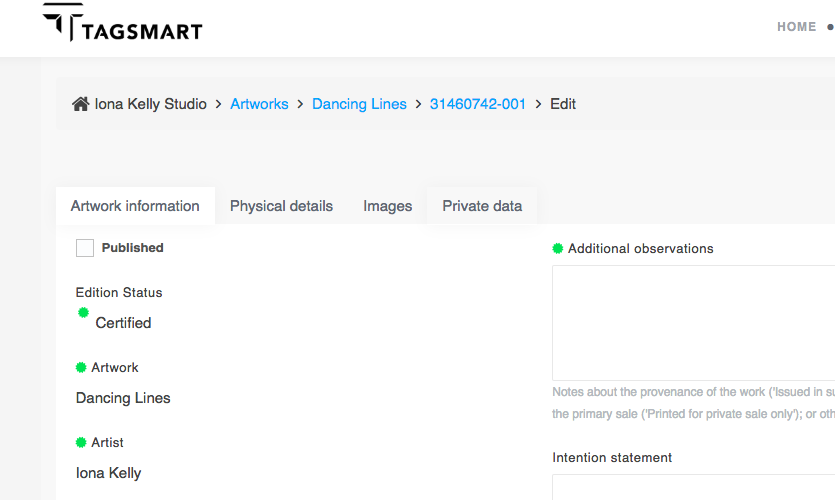
STEP 2: Click on Private Data to open that tab.
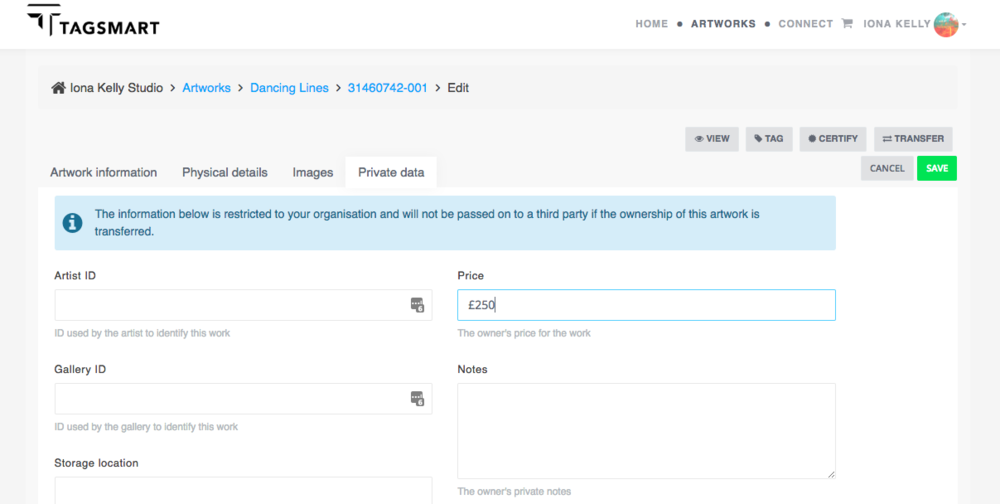
STEP 3: Enter a price in pounds sterling excluding VAT and click on ‘Save’.
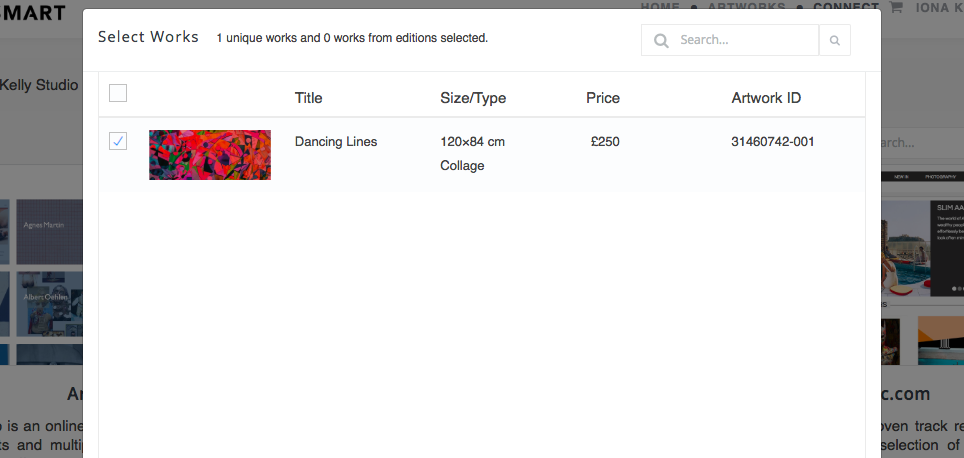
STEP 4: The price will be visible when you submit the artwork to a channel.
How to Submit an Artwork to a Channel
Click on the black arrow to the right of the slide below to find out how to select an artwork and submit it to a channel.
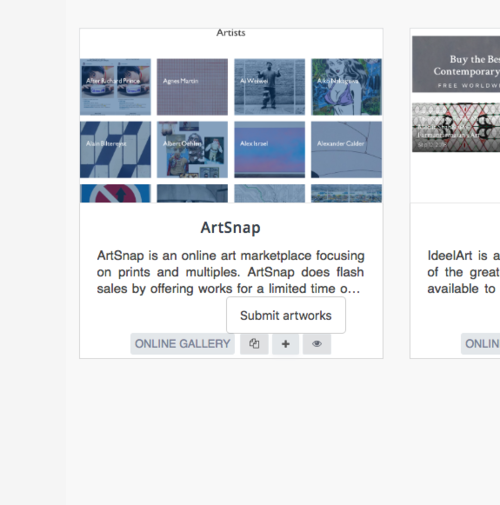
STEP 1: Click on the plus icon to start the selection process.
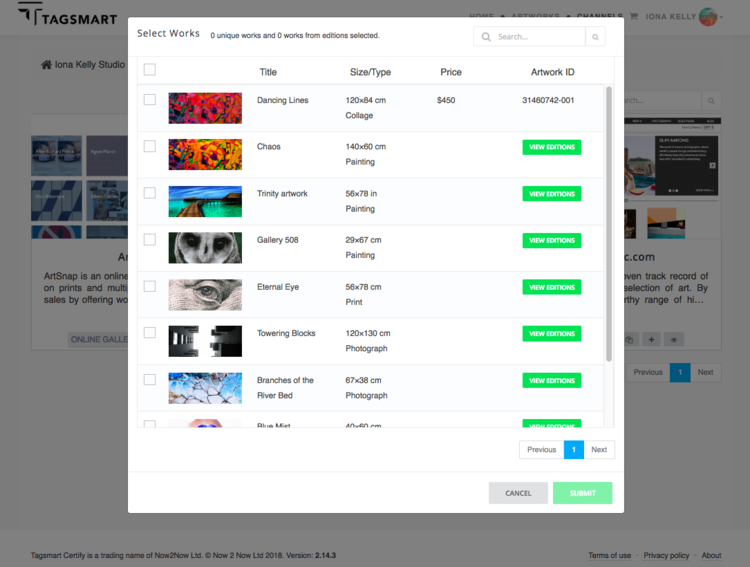
STEP 2: Browse and select verified artworks. Unverified artworks will not be visible. To learn how to verify an artwork, see the relevant section of this guide.

STEP 3: If you have editions, click on View Edition to expand the edition or scroll down to see other works.
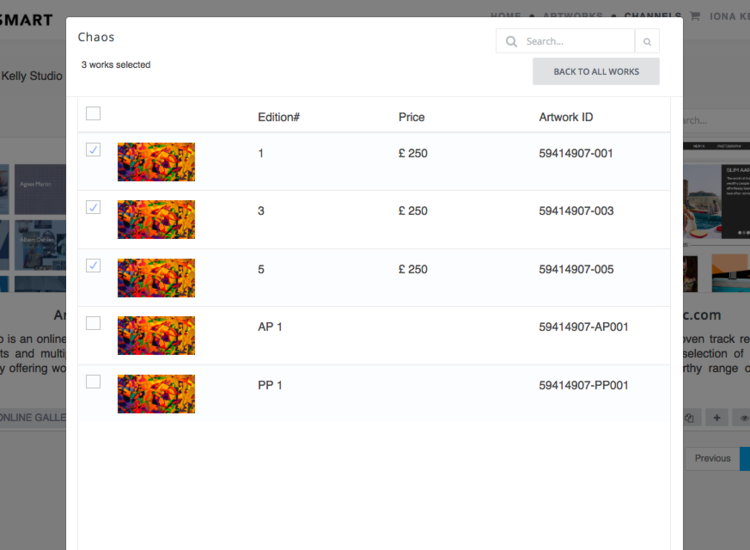
STEP 4: In Edition View mode, tick the box next to each edition you wish to submit or tick the box at the top to select all editions. Click on Back to All Works to return.
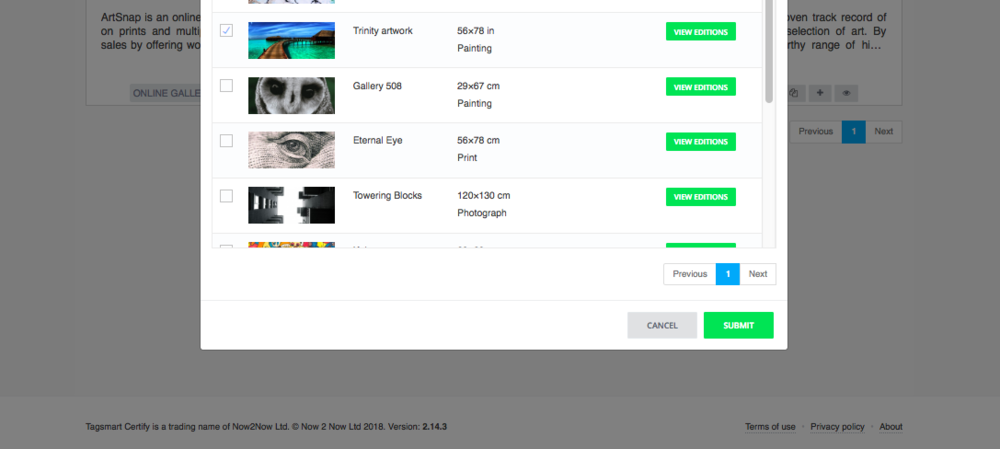
STEP 5: Click on Submit at the bottom right to proceed.
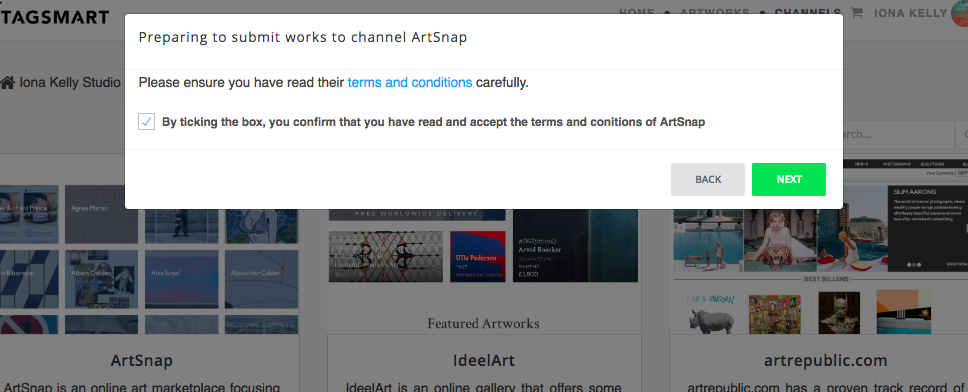
STEP 6: Review and accept the Channel terms and conditions.
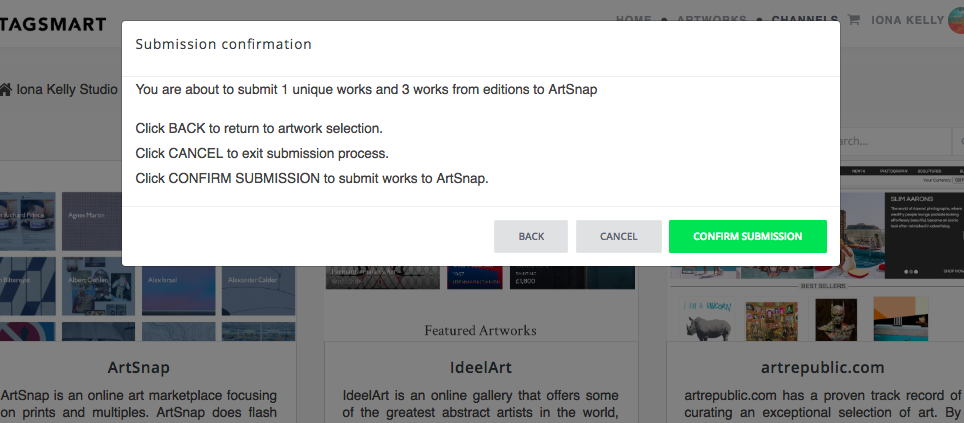
STEP 7: Review and confirm your submission.

STEP 8: You will receive a confirmation notice. For more information about what happens next, see the next part of this guide.
How to View the Status of Submitted Artworks
Click on the arrow to the right of the slide below to find out how to keep track of the status of submitted artworks.
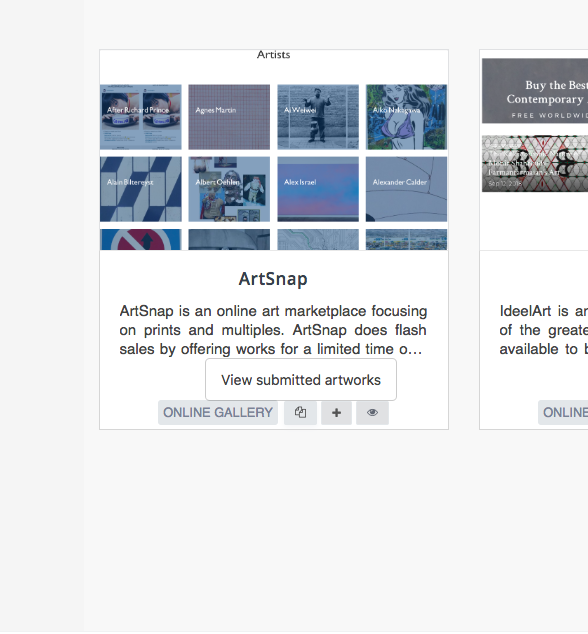
To get started... Click on the pages icon to view submitted artworks.

SUBMITTED ARTWORKS: If Submitted is highlighted at the top of the portal, you will see all artworks that have been submitted to that channel. The retailer has up to 10 days to review submissions and make a decision to accept or release them.

ACTIVE ARTWORKS: Click on Active at the top right of the portal to view all artworks that have been accepted. The status of individual artworks will be visible e.g. On Sale (meaning the retailer has posted the artwork on their site).
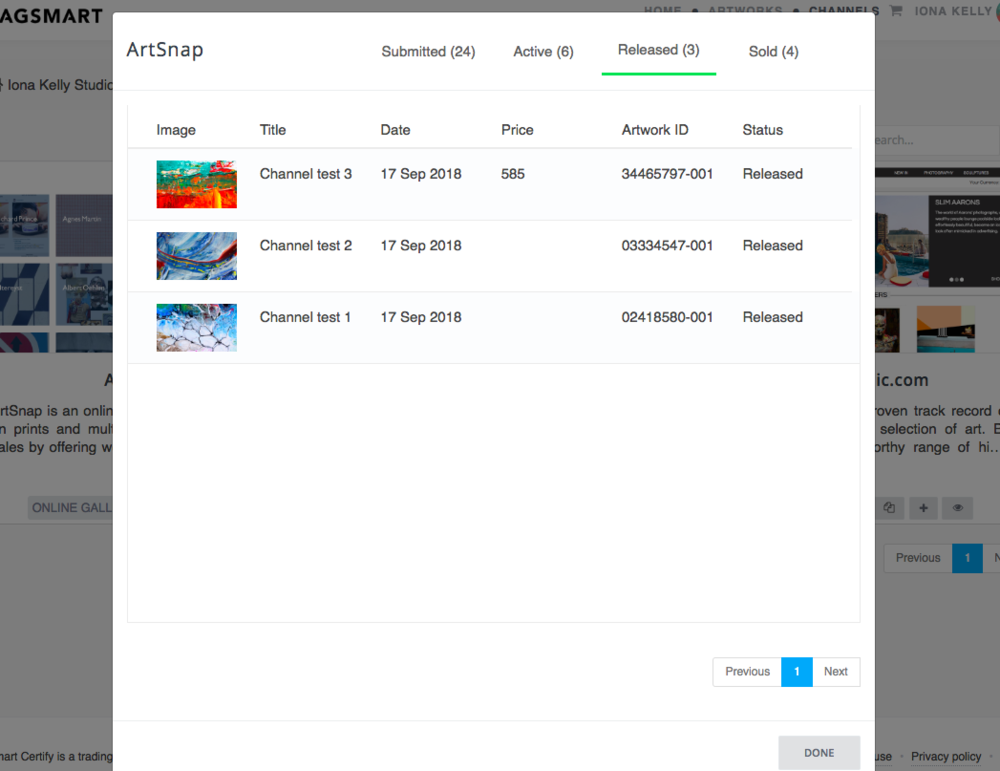
RELEASED ARTWORKS: Click on Released at the top of the portal to view all artworks that the Channel has decided to release back to you. After an artwork is released you can submit it to a different channel.

SOLD ARTWORKS: Click on Sold at the top right to view all sold artworks.
When an Artwork is Sold
When an artwork is sold, the channel will update the status (see previous section) and the artist will be notified that they need to take action. The artwork must then be:
tagged and certified - upon sale the artist must physically tag their artwork and assign the unique tag ID number to the digital artwork record to complete the tagging process (click here to learn how). A Certificate must also be ordered, which can be done directly through the platform (click here to learn how). Provided that the tag ID is assigned, the Certificate will be free of charge.
shipped - depending on the channel terms and conditions, the artwork will need to be delivered either directly to the collector or to the channel themselves. These terms will be visible on the channel’s profile which you can access via your account.
DNA Tags
How to Order a DNA Tag
Click on the arrow to the right of the slide below to find out how to order tags.
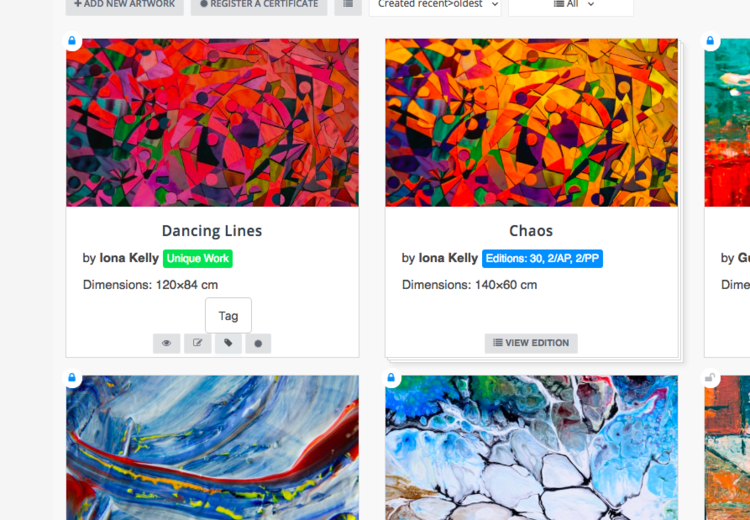
STEP 1: For a Unique Work click on the tag icon or for a Limited Edition click on View Edition and then Tag Works at the top right of the artwork record.
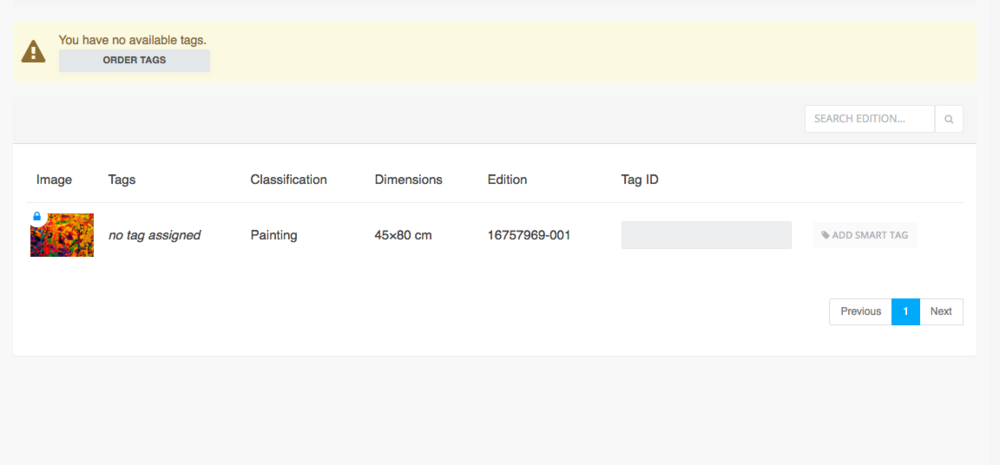
STEP 2: If you have tags available these will be listed at the top of the screen. Otherwise click on Order Tags.

STEP 3: Fill out and submit the Order Form. Choose the tag type, number and level of service you require. When we receive the order we will review it and may call you to confirm arrangements.
How to Tag an Artwork
Click below for more information on how to apply tags to an artwork.
How to Assign a DNA Tag to an Artwork
Click on the arrow to the right of the slide below to find out how to assigning the tag ID to the artwork. This is essential for completing the authentication process. Ensure that the Tag ID is assigned before issuing a Certificate otherwise available discounts will not apply.
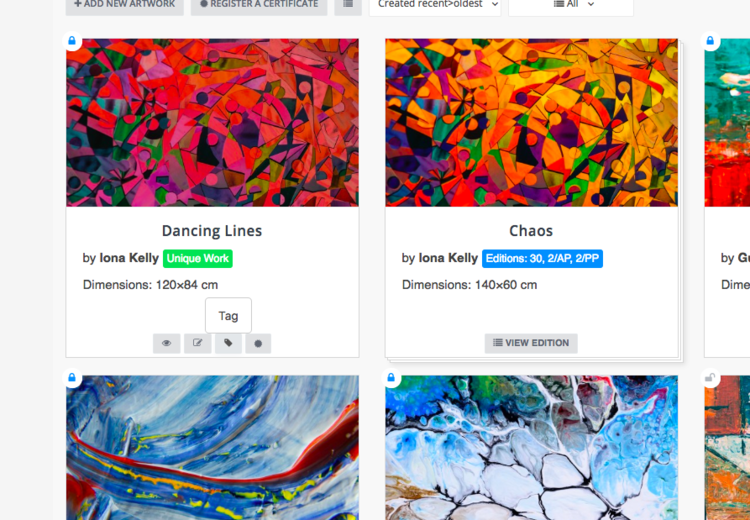
STEP 1: For a Unique Work click on the tag icon or for a Limited Edition click on View Edition and then Tag Works at the top right of the artwork record.
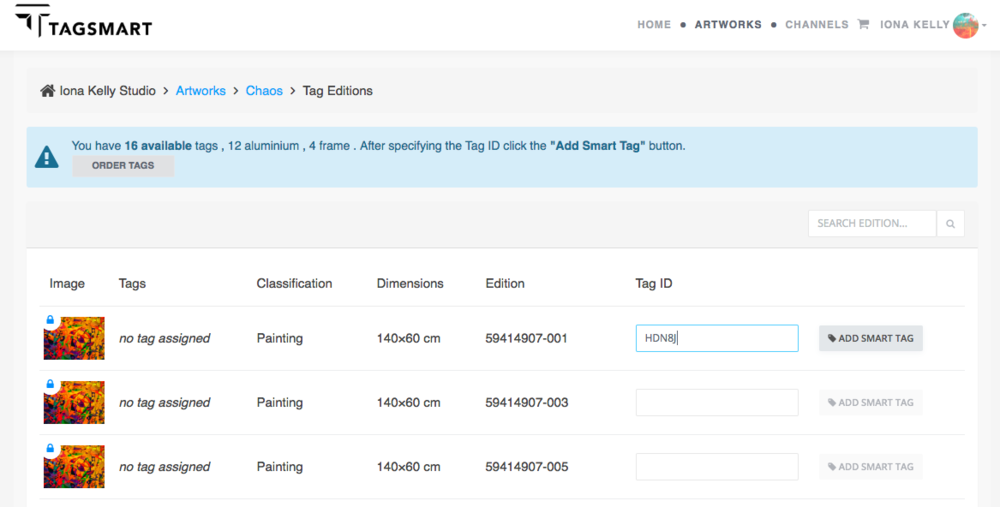
STEP 2: Enter the Tag ID and click on Add Smart Tag.

STEP 3: Click ‘yes’ to confirm or ‘back’ to cancel. If the assignment is successful you will receive a notification. Otherwise, please contact support@tagsmart.com and we will assist you.
Issue a Certificate
Click on the arrow to the right of the slide below to find out how to issue a Certificate.

STEP 1: For a Unique Work click on the rosette icon or for a Limited Edition click on View Edition and then the rosette icon.
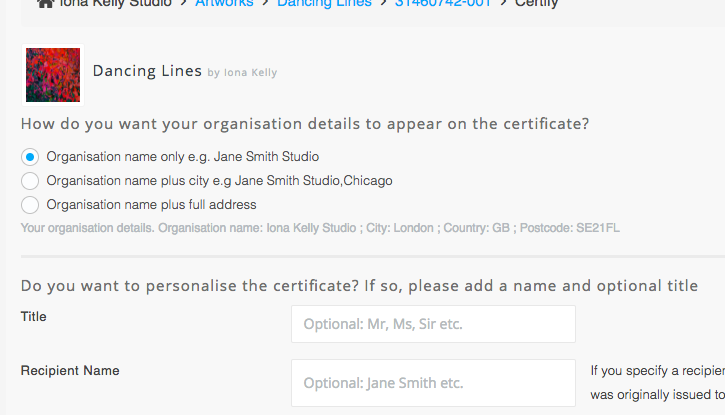
STEP 2: Select how you would you studio/gallery to appear on the Certificate. E.g. just the name or your full address. If you haven’t already, you will need to add an address.

STEP 3: Choose whether to personalise the Certificate with the collector’s name.
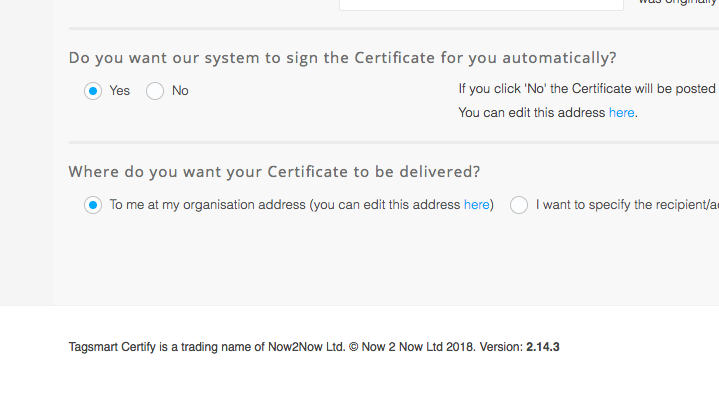
STEP 4: Select whether you’d like the Certificate to be automatically signed using the signature you submitted to us. If you select ‘no’ the Certificate will be sent to you to be signed by hand and you will need to forward it to the recipient.
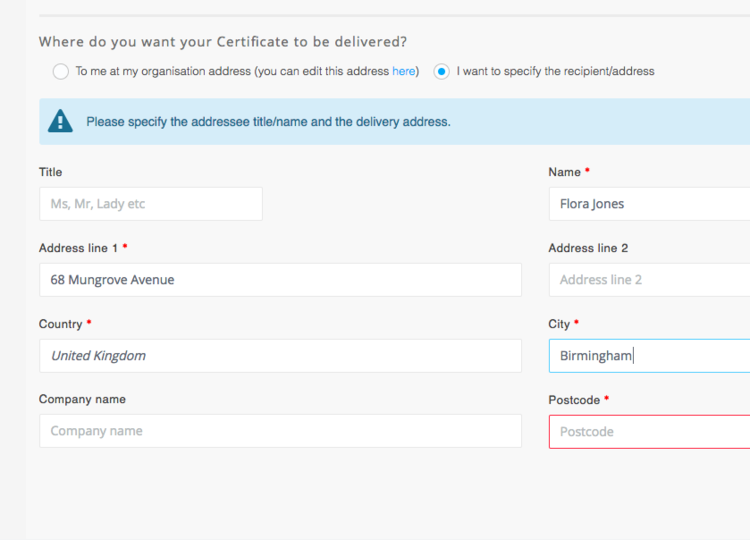
STEP 5: Specify the delivery address: if you click ‘yes’ you can enter a new address, if you click ‘no’ the Certificate will be delivered to you to forward to the recipient. Then click Certify.

STEP 6: You will be directed to payment. If you haven’t already you will need to enter the details of a card by clicking Add Card. Click Continue to complete the transaction.
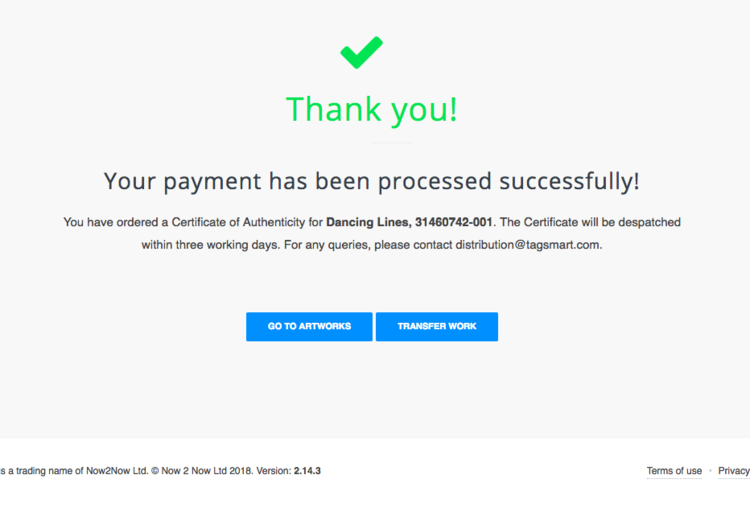
STEP 7: After completing the order, it is essential that you transfer the artwork. Click on Transfer Work and follow the steps in the next part of the guide.
Transfer The Provenance Record
What Is A Transfer?
A transfer crucially enables ownership confirmation. Other benefits of completing a transfer include collector access to the artwork record and the ability to easily request a replacement Certificate.
You can issue a Certificate separately from starting a transfer, the advantage of this being that you can issue a Certificate at any time. You can then consign the work along with the Certificate and transfer it at a later stage i.e. when it is sold.
How To Start A Transfer
Click on the arrow to the right of the slide below to find out how to start a transfer.

STEP 1: For a Unique Work click on the parallel lines icon or for a Limited Edition click on View Edition and then the icon.

STEP 2: Tick the box at the top of the page to confirm that the Certificate will be delivered to the intended recipient. You can add private notes about the transfer if you wish.
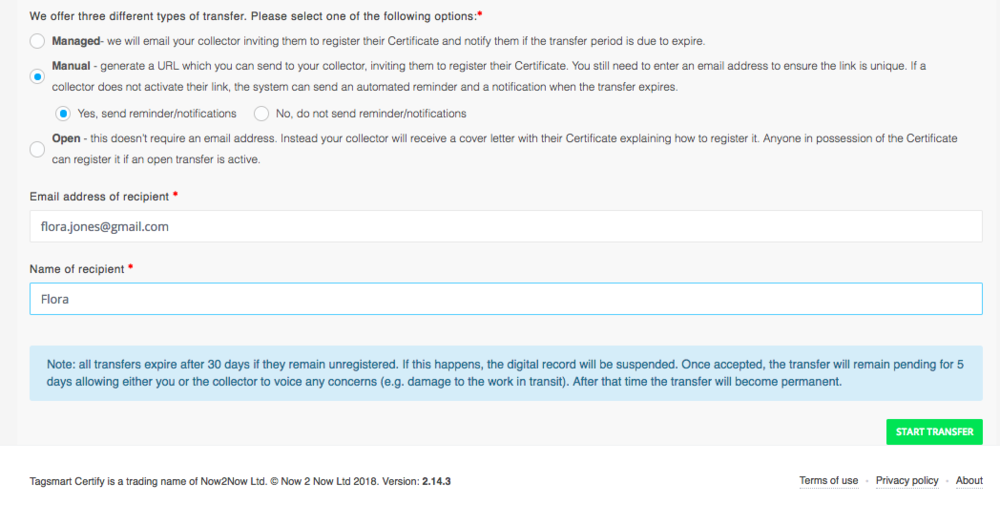
STEP 3: Select one of the 3 transfer options. Managed - we will invite your collector to register their Certificate by email and notify them if the transfer period is due to expire. Manual - send a unique URL to your collector, inviting them to register their ownership. Choose whether to send reminders. Open - this doesn’t require an email address. Instead your collector will receive instructions with their Certificate explaining how to register it. Anyone in possession of the Certificate can register it if an open transfer is active.
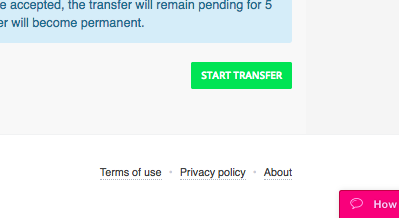
STEP 4: Click on Start Transfer.
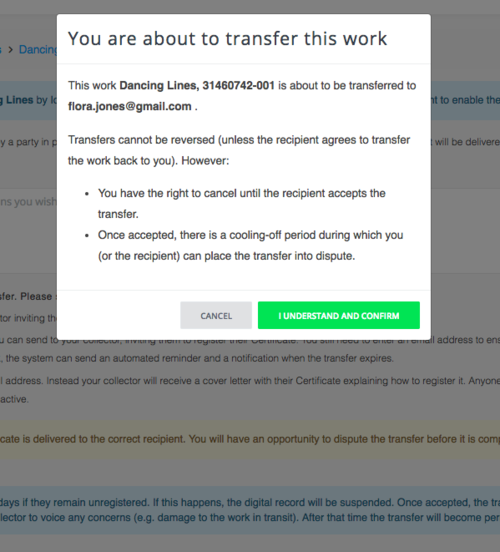
If successful, you will receive a confirmation notification. NB all unregistered transfers will expire after 30 days and the digital record will be suspended. Once accepted, the transfer will remain pending for 5 days allowing either you or the collector to voice any concerns (e.g. damage to the work in transit). After that time the transfer will become permanent.